
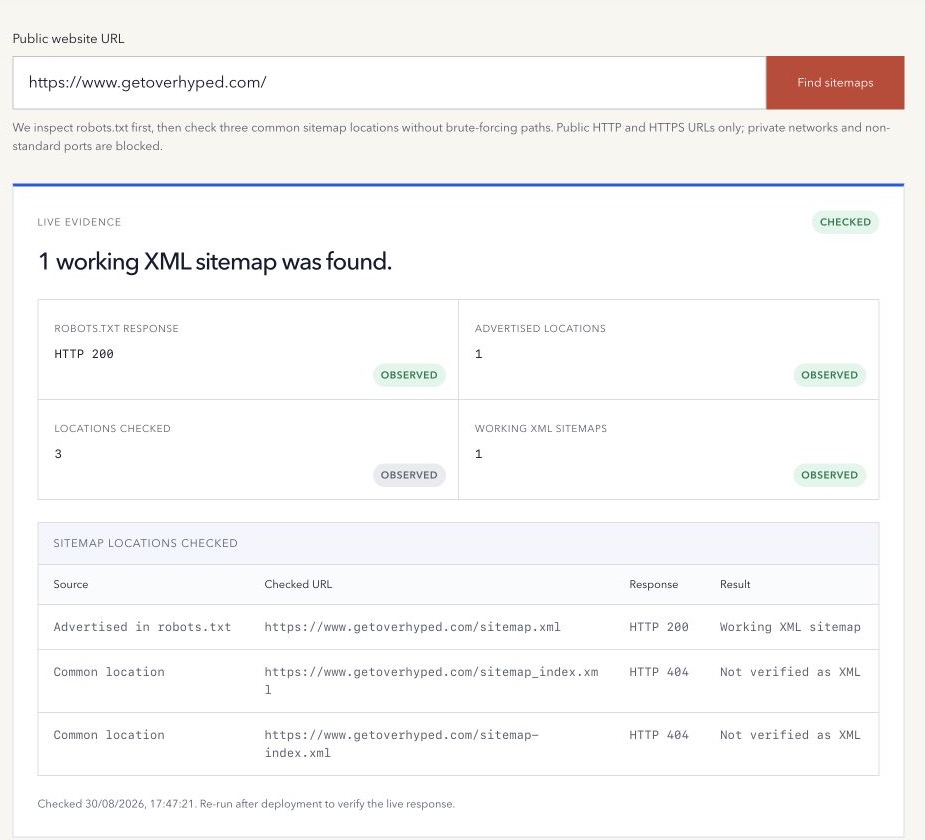
An XML sitemap can be published at almost any public URL. /sitemap.xml is common, not mandatory.
That is why sitemap discovery should begin with declared evidence and use common paths only as a bounded fallback.
Start with robots.txt
Request the site’s root /robots.txt file and look for lines beginning with Sitemap:. A declaration should contain a complete public sitemap URL.
User-agent: *
Allow: /
Sitemap: https://example.com/sitemap.xml
Google documents robots.txt declarations as one way to make a sitemap available, alongside Search Console submission. A file may contain more than one declaration. See Google’s sitemap submission guidance.
Check a short list of common locations
When robots.txt contains no declaration, a few conventional paths are reasonable to inspect:
/sitemap.xml/sitemap_index.xml/sitemap-index.xml
Do not turn this into unlimited path probing. Failing to find a file at these locations does not prove that no sitemap exists.
Verify the response, not the filename
A URL ending in .xml can return a branded HTML error page with HTTP 200. A useful discovery result should record:
- The entered website URL.
- The location checked.
- Whether it came from robots.txt or a common-path fallback.
- Redirects and final URL.
- Final HTTP status and content type.
- Whether the response contains a sitemap root such as
<urlset>or<sitemapindex>.
This evidence separates a real XML resource from a soft 404 or an unrelated response.
How to check a sitemap in your browser
Open the discovered sitemap URL. Some sites show a styled list, while others show raw XML. Either presentation can be valid. Look at the file’s root element:
<urlset>contains page entries. Each<url>should contain a complete page address in<loc>.<sitemapindex>contains sitemap entries. Open a listed<loc>to inspect a child sitemap rather than treating those file addresses as content pages.
For example, <loc>https://example.com/about</loc> is an absolute page URL. <loc>/about</loc> is relative and needs correction in the sitemap source.
Use the free XML Sitemap Validator to check the file’s selected structural rules, missing locations, relative URLs, duplicates, and date formats. It does not crawl every listed page or validate child sitemaps recursively. A successful check cannot prove that Google has indexed the contents.
Find a WordPress or Shopify sitemap
WordPress core uses /wp-sitemap.xml for its sitemap index when the feature is enabled. An SEO plugin can replace the core output, so use the location advertised by the active setup. See the WordPress core sitemap reference.
Shopify generates an index at the store domain’s /sitemap.xml, with links to its content sitemaps. Open the relevant child file to inspect page or product locations. See Shopify’s sitemap guidance.
These are platform examples, not universal paths. Overhyped’s finder checks robots.txt and three common paths; /wp-sitemap.xml is not an additional automatic fallback. If an unadvertised platform-specific file is needed, check that exact location manually.
How to download an XML sitemap
- Open the verified sitemap URL in your browser.
- Use the browser’s Save Page As command and save the XML response with an
.xmlextension. Avoid saving a screenshot or a complete webpage bundle. - Open the saved file in a text editor and confirm it contains
<urlset>or<sitemapindex>, rather than an HTML error page. - If it is an index, download the relevant child sitemap files separately. Saving the index does not download those files.
- Keep the source URL and capture date beside the copy so you can distinguish an older snapshot from the current file.
A browser may save a styled representation instead of the underlying XML. If the saved file is HTML, use a plain HTTP download:
curl --fail --location 'https://example.com/sitemap.xml' --output sitemap.xmlReplace the example with the public sitemap URL you verified. Then inspect the downloaded contents; a successful HTTP response alone does not establish that the file is sitemap XML. You can paste XML into the validator, whose public fetch limit is 2 MB, for a separate structural check.
Finding is not validating
Discovery answers where a sitemap is publicly available. It does not establish that the XML is well formed, that every location is canonical, or that search engines have accepted the file.
Use the XML Sitemap Validator for file structure, absolute locations, duplicates, dates, and origin evidence. If the site has no maintained file and you already have an approved canonical URL set, generate sitemap XML separately. Then use Search Console on a verified property when you need Google’s private submission and processing evidence.
An XML sitemap is a machine-readable URL inventory. An HTML sitemap is a normal page designed to help visitors and crawlers navigate. A sitemap index is another XML file that lists several sitemap files, which is useful when a site separates content types or exceeds a single file’s limits.
Several sitemaps are not automatically a problem. Confirm that each file has deliberate ownership, contains canonical destination URLs, and does not conflict with redirects, noindex, or internal-link signals.
A sitemap is a hint, not an indexing result
Google describes sitemap submission as a hint. A discovered or submitted sitemap does not guarantee that it will be fetched or that its URLs will be crawled, indexed, ranked, or displayed.
Small, well-linked sites may not need a sitemap. Larger, newer, media-heavy, or frequently changing sites often benefit more from one. See Google’s sitemap overview.
A safe discovery workflow
- Normalize the website to its public origin.
- Fetch root robots.txt through guarded public-only networking.
- Record every valid Sitemap declaration.
- Check those declarations first.
- Check only a bounded fallback list when useful.
- Confirm final response and XML evidence.
- Validate the discovered file separately.
- Record the limits of the discovery method.
Find advertised and common XML sitemap locations with the free Sitemap Finder, then validate any discovered file as a separate step.
If sitemap work is part of a wider migration or recurring crawl and indexing problem, review how Overhyped scopes managed SEO and AEO work before onboarding. The exact implementation responsibilities are agreed in writing for each engagement.
Method note: the tool checks root robots.txt and three bounded common locations. The platform-specific and download steps above are manual checks. It does not brute-force paths or inspect private Search Console data. Last reviewed 16 October 2026.