
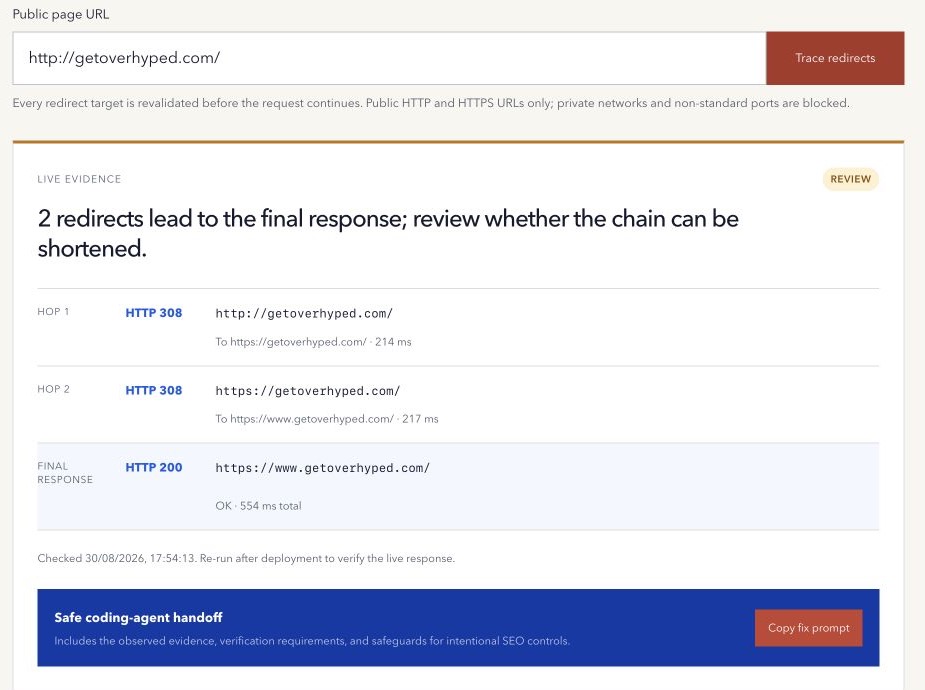
A redirect is useful when an old URL has a real new destination. A chain appears when the first URL redirects to another redirect before the visitor reaches the final page.
The browser may complete that journey quickly enough to hide the extra work. The server responses still matter.
What counts as a redirect chain
A direct move looks like this:
/old-page → /new-pageA chain adds avoidable steps:
/old-page → /older-destination → /temporary-path → /new-pageEach server redirect should include a 3xx status and a Location header that identifies the next destination. The HTTP standard defines the redirect semantics in RFC 9110.
Why shorter paths are easier to maintain
Every hop requires another request. Chains can add latency, create more points of failure, complicate caching, and make a migration harder to audit. They can also leave internal links pointing at URLs the site no longer wants people to use.
Google recommends redirecting to the final destination directly and keeping unavoidable chains short in its site-move documentation.
The practical goal is not a perfect score. It is a clear path with an intentional final destination.
Choose permanent or temporary deliberately
Use a permanent server-side redirect such as 301 or 308 when the old URL has a lasting replacement. Google treats permanent redirects as a canonicalization signal.
Use a temporary redirect such as 302 or 307 when the original URL should remain the long-term reference and the alternate destination is genuinely temporary. Google’s redirect guidance explains how these choices inform Search.
307 and 308 unambiguously preserve the request method. Method handling matters for forms and APIs, so do not change a status code mechanically without understanding the request.
Common sources of chains
Chains often accumulate when separate rules handle HTTP-to-HTTPS, hostname changes, trailing slashes, locale paths, CMS migrations, and renamed pages.
For example, one rule may send HTTP to HTTPS, another may add www, and a third may map an old slug. Combining those decisions can create several hops even though one rule could point directly to the final HTTPS URL.
Campaign links and third-party shorteners can add another layer. Record what you control separately from external redirects you cannot change.
Check for loops and unsafe destinations
A loop sends a request back to an earlier URL and never reaches a final document. A broken chain may point to a missing page, an unsupported protocol, or an unintended host.
Trace redirects with a strict hop limit. Revalidate every destination before requesting it, especially in a public tool, and stop when the chain becomes unsafe or exceeds the limit. Partial evidence is more useful than pretending the request completed.
Server redirects and browser redirects are different
An HTTP redirect is returned by the server with a 3xx status and a Location header. JavaScript navigation and HTML meta refresh can also move a browser, but they are not part of the same server-response chain and a simple HTTP tracer will not execute them.
Cookies, browser cache, geography, authentication, and user-agent rules can produce another path. When the trace and browser disagree, record both results and find which application, proxy, CDN, or client script owns the extra move.
A safer redirect cleanup
- Start with the exact old URL, including protocol and hostname.
- Record every status and resolved
Locationdestination. - Confirm that the final page is the correct replacement.
- Point the original URL directly to that final destination where possible.
- Update internal links, navigation, canonical tags, and sitemap entries to use the final URL.
- Preserve query parameters only when the destination needs them.
- Test old URLs after deployment and monitor important migrations in Search Console and analytics.
Do not redirect every removed page to the homepage. When there is no relevant replacement, a correct 404 or 410 can be clearer for users and systems.
Trace every observed HTTP redirect hop with the free Redirect Chain Checker, then confirm the intended destination before changing any rule.
If redirect cleanup is part of a wider migration or recurring search-visibility problem, review how Overhyped scopes managed SEO and AEO work before onboarding. The exact implementation responsibilities are agreed in writing for each engagement.
Method note: the checker revalidates every public destination and stops after a bounded number of hops. Results can vary by location, headers, cookies, and server state. Last reviewed 13 September 2026.