
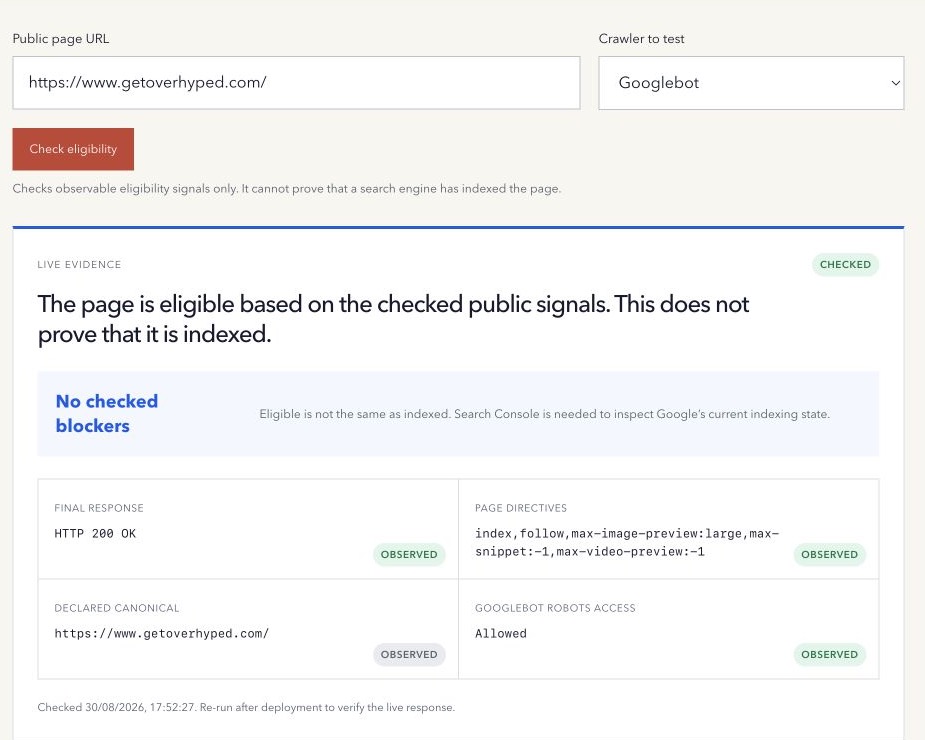
“Can this page be indexed?” and “Is this page indexed?” are different questions.
The first can often be investigated from public technical evidence. The second depends on the search engine’s current private index data and processing history.
Page indexing example: eligible, indexed, or excluded
Imagine a newly published guide that returns 200, allows Googlebot, has no noindex, and declares the intended canonical. Those live checks support eligibility. They do not show whether Google has discovered or processed it.
| Evidence | What it tells you | Next step |
|---|---|---|
| Live checks find no tested blocker | The page appears eligible under the checks performed. | Inspect the exact URL in Search Console. |
| URL Inspection says the URL is on Google | Google reports it as indexed in the stored view. | Compare the last crawl with your latest release. |
| The URL is excluded as an intentional duplicate | Another representative may be preferred. | Verify the canonical decision before changing anything. |
These are hypothetical states, not results for your page. Search Console’s live test and stored index view answer different questions.
How to index a page: a practical submission workflow
- Confirm that the page should appear publicly in Search. Preserve deliberate exclusions and private content controls.
- Publish useful content at the intended URL. Check access, response, robots directives and canonical consistency with the Indexability Checker.
- Link to it from a relevant discoverable page and include the preferred URL in the sitemap where appropriate.
- Inspect the exact URL in your verified Search Console property. Review the reason if it is not indexed; compare the last crawl with the deployment time.
- Fix confirmed issues, deploy, and use the live test to check the current version. Request indexing for an eligible priority URL when appropriate and record an explicit confirmation.
- Recheck after Google has had time to crawl and process it. A successful request is a submission, not confirmation of indexing.
For many URLs, maintain a sitemap rather than repeatedly submitting each URL. Requests have quotas; repeatedly requesting the same URL does not make crawling faster. Google’s recrawl guidance explains the available methods and limits. Neither a sitemap nor a request guarantees inclusion or a completion date.
What indexable means
A page appears technically eligible when a crawler can request it, receive a usable response, access the content under the applicable robots rules, and find no supported noindex directive.
Those checks can identify clear blockers. They cannot force discovery, crawling, canonical selection, processing, or inclusion in search results.
Google explicitly says it cannot guarantee when or whether a URL will be crawled or indexed in its crawling and indexing FAQ.
What a public checker can observe
For one live URL, a checker can inspect:
- the requested and final URL after bounded redirects;
- the final HTTP status and content type;
- robots meta directives in the HTML;
X-Robots-Tagresponse headers;- the declared canonical URL;
- crawler-specific access under the site’s public
robots.txtrules.
This evidence can support a conclusion such as “no checked blocker was found” or “the page exposes a noindex directive.” It should not produce the stronger claim “Google has indexed this page.”
Why robots.txt and noindex are different
Robots.txt manages crawler access. A noindex directive tells supporting search engines not to include the content in search results.
Google must be able to crawl a page to see its meta robots or X-Robots-Tag directive. If robots.txt blocks the URL, Google may not discover the noindex value. Google explains this interaction in its noindex documentation.
Do not use robots.txt as a substitute for removing a public page from search. Do not use either mechanism as access control for confidential content.
Canonicalization adds another decision
A page can return 200, allow crawling, and expose no noindex, yet declare another URL as canonical. That does not necessarily make the page broken. It signals that another equivalent URL is preferred.
Google may also select a different canonical when signals conflict. Review the page as part of a URL set rather than scoring the presence of a self-canonical in isolation.
How to check actual Google indexing
Search Console URL Inspection separates Google Index data from a live test. The indexed view reports what Google currently knows from its system. The live test evaluates whether the current page can likely be indexed, but it does not prove inclusion.
Google’s URL Inspection help documents that distinction. Use it on a verified property after checking the public live page.
Being indexed is also not a ranking guarantee. A page can exist in the index without appearing for the searches you care about.
Use the free Indexability Checker to inspect one page’s observable eligibility signals without confusing them with indexing.
Method note: the checker evaluates a guarded public response, selected directives, canonical evidence, and named-crawler robots access. It has no private search-index access. Last reviewed 17 October 2026.