
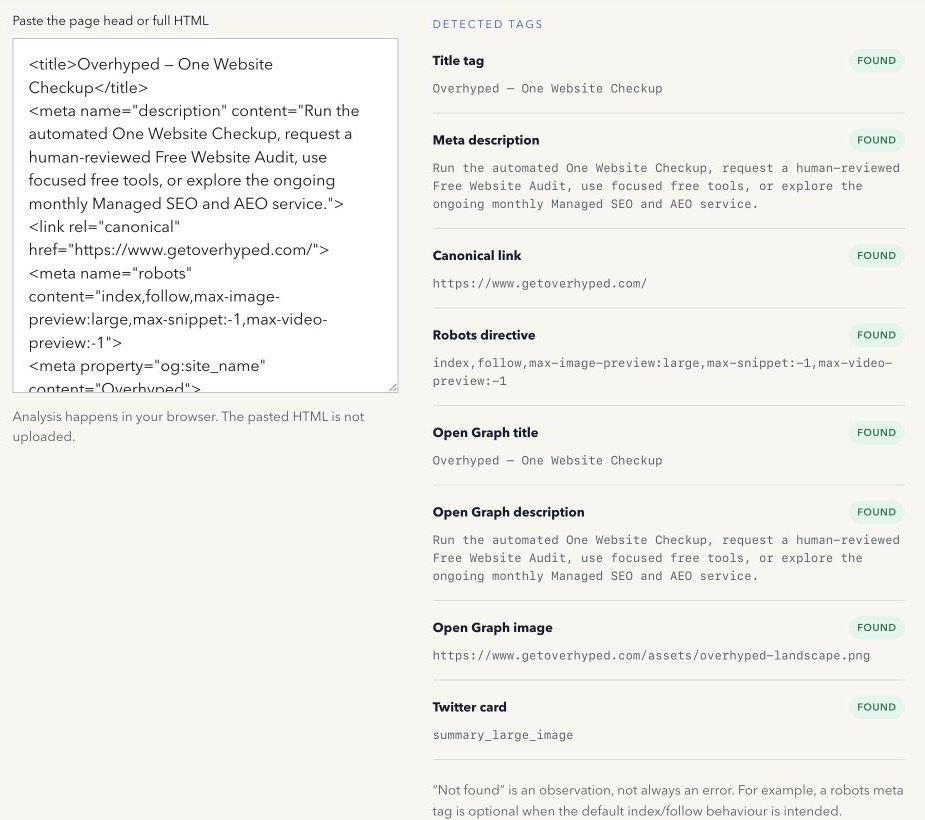
Meta tag checklists often mix useful controls, optional hints, obsolete keywords, and social markup into one score. A missing optional tag then looks as serious as a page that cannot be indexed.
A better approach is to ask what each element controls and whether the page needs it.
Title element
The title element is not technically a meta tag, but it belongs in every useful page-head review. It names the document for browsers and helps search systems understand the page. Make it accurate, concise, and distinct.
Google may still create a different title link from visible page signals. Treat the title as a strong input, not a guarantee.
Meta description
The description can provide a useful search-result summary. Google may instead select visible page text that better matches a query. A missing description is worth reviewing on an important page, but it is not proof that the page cannot rank.
Robots meta directive
The robots meta tag can control indexing and following for supporting crawlers. It deserves careful review because a noindex value can intentionally or accidentally remove a page from eligible search results.
Its absence is not automatically an error: the normal default does not require an explicit index,follow tag. Google documents supported directives in its robots meta guidance.
Canonical link
The canonical element is also a link element rather than a meta tag. It indicates a preferred URL among duplicate or very similar pages. Use an absolute, indexable URL that reflects the real consolidation decision.
A canonical is a hint, and conflicting signals can cause a search engine to select another URL. Google’s canonical documentation explains the available methods.
Open Graph and Twitter Cards
Open Graph values describe the title, description, image, URL, and type used by many sharing products. X recognises Twitter Card markup and can use Open Graph fallbacks.
These tags primarily help with social context. Do not turn their presence into a direct Google ranking claim.
Charset and viewport
A character encoding declaration helps the browser decode the page correctly. The viewport meta tag helps responsive layouts behave as intended on mobile. They are foundational web implementation details even though they are not keyword signals.
Meta keywords
Do not spend time generating a meta keywords list for Google. Google states in its special tags documentation that the Google Search appliance ignores the keywords meta tag.
Check intent, not only presence
An automatic checker can report the exact tags and values it observes. A person still needs to decide whether the canonical is correct, whether noindex is intentional, whether social text matches visible content, and whether duplicate declarations conflict.
Inspect both the original server HTML and the rendered browser DOM when JavaScript may change the page head. Then verify the public live URL after deployment.
Missing, duplicated, and conflicting values need different responses. A missing optional social tag may only affect a particular preview, while competing canonical or robots declarations can change how a page is understood. Find which template, plugin, framework, or script owns each value before editing it.
Search metadata and social metadata also have different outcomes. Use Search Console to observe Google queries and search appearance; use the destination platform’s supported preview or cache debugger for sharing cards. Neither result should be inferred from a pasted-markup check alone.
Use the free Meta Tag Checker to inspect pasted HTML locally. For a public URL, use the One Website Checkup or Social Link Preview.
Method note: the checker reports selected markup in pasted HTML and does not score intent. Last reviewed 13 September 2026.