
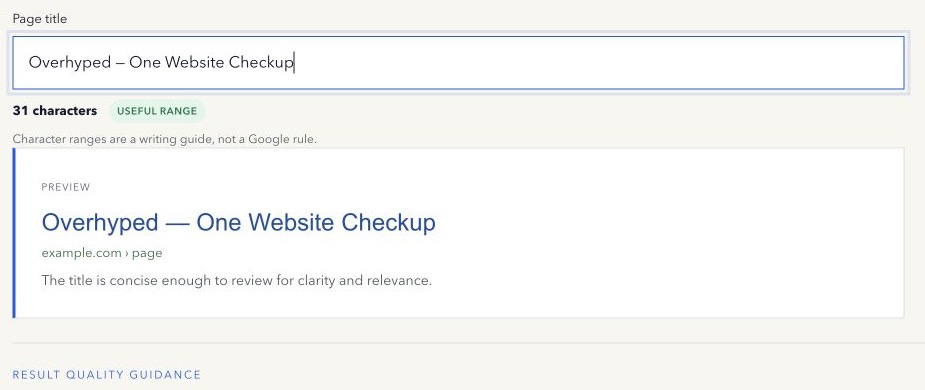
“Keep every title under 60 characters” sounds precise, so it is easy to turn into a rule. Google does not publish a universal 60-character title limit.
The number survives because it is a useful editing range. Many concise titles fit comfortably in a result. But display space is closer to a visual width than a fixed character count, and Google can rewrite the title anyway.
Why characters do not equal display width
Letters have different widths. A line filled with narrow characters takes less space than the same number of wide capitals. Device layout, font treatment, the result format, and other elements can also change the room available.
A character counter therefore helps with discipline, not prediction.
What a good title needs to do
The title should identify the page accurately and distinguish it from other pages on the same site. Put the real topic where it can be understood quickly. Add the brand only when it helps. Remove repeated phrases and unsupported claims.
Do not shorten a title until it becomes vague. “Services” may fit beautifully while telling a searcher almost nothing. “Immigration legal services for UK founders” is longer but communicates a specific page purpose.
The title tag sits in the document head and can become the title link in search. The H1 is the main visible heading. They can use different wording, but both should describe the same page and make its primary topic clear. Give every important indexable page a distinct title so people can tell similar results apart.
When a long title needs work
A long title often reveals one of four problems:
- The same idea appears twice.
- Several different page topics have been forced into one title.
- A template adds unnecessary boilerplate.
- Keyword variations are being listed instead of using natural language.
Fix the underlying writing problem. Do not cut meaningful words only to turn a counter green.
When a short title needs work
A short title is not automatically incomplete. A well-known product name or a highly specific article title may need few words. Add context only when it helps a person identify the page.
Check the title beside the H1, description, URL, and visible opening text. These parts should describe the same page without being mechanically identical.
What happens after publishing
Google may use the title element or create a title link from other prominent page signals. Its title links guidance recommends descriptive, concise text and warns against boilerplate and keyword stuffing.
If the displayed title differs, investigate the page context before changing length. A rewrite is not proof that the title was one character too long.
Compare the displayed wording with the title element, H1, prominent page text, and internal-link anchors. Google can use these sources when it believes they represent the page more clearly. After an edit, verify the live HTML and monitor the page’s actual Search Console queries before changing it again.
Use the count correctly
Start with meaning. Use a broad range to notice possible excess. Read the title aloud. Compare it with neighbouring pages. Publish it, inspect the live source, and observe real queries.
Try the free Title Tag Length Checker. It counts characters while keeping the limitation beside the result.
Method note: the range is an editing aid, not a scoring or ranking threshold. Last reviewed 13 September 2026.