
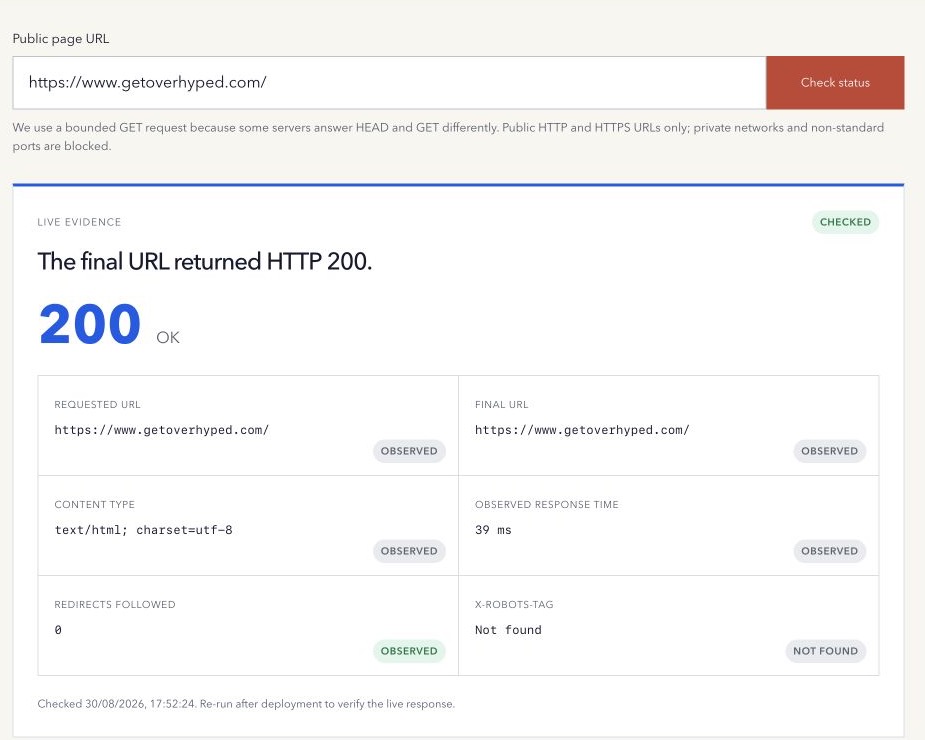
When a page looks normal in a browser, it is easy to assume the server response is also correct. A friendly error template can still return 200 OK, and a page that eventually loads may pass through several redirects first.
The status code is the server’s first piece of evidence. Read it together with the URL path and final content.
HTTP status codes list: common responses and next checks
This is a practical shortlist for public-page diagnosis, not every status defined by HTTP. The HTTP Semantics specification defines the protocol meanings.
| Code | Meaning | What to check next |
|---|---|---|
| 200 OK | The request succeeded. | Confirm the intended content, not only the number. |
| 204 No Content | The request succeeded without response content. | Confirm that an empty response is intended for this URL. |
| 301 Moved Permanently | A permanent move. | Verify the destination and whether the move is deliberate. |
| 302 Found | A temporary destination. | Preserve temporary intent and inspect where it finishes. |
| 307 Temporary Redirect | A temporary redirect that preserves the method. | Check the destination; do not infer POST behavior from a GET test. |
| 308 Permanent Redirect | A permanent redirect that preserves the method. | Verify the preferred URL and publishing intent. |
| 401 Unauthorized | Valid authentication credentials are needed. | Confirm whether access should require login. |
| 403 Forbidden | The server refuses the request. | Review deliberate access rules and automated-request filtering. |
| 404 Not Found | No current representation was found. | Check the URL and whether the resource should exist. |
| 410 Gone | The resource is unavailable and likely permanently gone. | Confirm deliberate removal before changing the response. |
| 429 Too Many Requests | The request was rate limited. | Retry appropriately and inspect rate-limit policy. |
| 500 Internal Server Error | The server encountered an unexpected condition. | Inspect application and server logs. |
| 502 Bad Gateway | A gateway received an invalid upstream response. | Inspect the upstream service and proxy path. |
| 503 Service Unavailable | The server is temporarily unable to handle the request. | Check overload, maintenance and any Retry-After guidance. |
| 504 Gateway Timeout | A gateway did not receive an upstream response in time. | Inspect upstream latency and timeouts. |
A 403 or 429 observed by an automated checker is not evidence that a page is permanently missing for every visitor. Compare a normal browser and operational evidence before replacing links or weakening access controls.
Example: a redirect followed by a successful response
Suppose a legacy URL returns 302 Found and the destination returns 200 OK. A checker that follows redirects may show a large final 200, while reporting one redirect and a different final URL. The original address did not return a direct 200 response.
The HTTP Status Code Checker shows the final response and selected evidence. Use the Redirect Chain Checker to inspect individual hops. Decide whether the temporary move is correct before changing it to a permanent redirect.
What the status classes mean
HTTP groups response codes by their first digit; 1xx responses are informational rather than the final result. The HTTP Semantics specification defines the main classes:
1xx— an informational response while processing continues;2xx— the request was successfully received, understood, and accepted;3xx— more action is needed, often following another URL;4xx— the request cannot be fulfilled as sent;5xx— the server failed to fulfil an apparently valid request.
These are protocol meanings. They do not judge the quality of the page or predict a search outcome.
Check the final response and the path to it
A checker that automatically follows redirects can hide the starting response if it reports only the final 200. Record both:
- the URL you requested;
- every redirect status and
Locationdestination; - the final URL and status;
- the response content type;
- selected crawler-control headers such as
X-Robots-Tag.
This separates a clean direct response from a page that reaches the same destination through unnecessary hops.
GET and HEAD can differ
Some tools use a HEAD request because it asks for headers without downloading the response body. Some servers, middleware, and security layers answer HEAD and GET differently.
For page diagnosis, a bounded GET request often provides more representative evidence because it follows the same basic method used to retrieve the document. It is still only one observation from one location and user agent.
A successful code does not prove a healthy page
A 200 response can contain an empty application shell, a login wall, an error message, irrelevant content, or a soft 404. A 404 can include a helpful human-readable page while correctly signalling that the requested resource is missing.
Similarly, one fast response is not a performance benchmark. Response time varies with location, cache state, network path, server load, and request headers.
The same URL can also respond differently because of cookies, authentication, geography, CDN cache, bot protection, or user-agent rules. A timeout or blocked automated request is incomplete evidence until it is compared with a normal browser and, where available, server logs.
Search indexing is another separate decision. A successful response makes a page retrievable, but Google still evaluates crawling controls, canonical signals, content, and its own indexing systems. Use URL Inspection for a verified property when the question is whether a specific URL is on Google.
A practical response-check workflow
- Check the exact public URL.
- Record the requested URL and final URL separately.
- Review every redirect rather than counting only the last response.
- Confirm that the content type and visible document match the status.
- Inspect caching and crawler-control headers when they affect the task.
- Fix the server or routing rule that owns the response.
- Deploy and run the same check again.
Use the free HTTP Status Code Checker to inspect one public URL’s final response and selected headers.
Method note: the checker makes one guarded, bounded public GET request and reports the response it observes. It is not uptime monitoring or a multi-region performance test. Last reviewed 17 October 2026.