
A sitemap is not a dump of every URL your server can return.
It is a maintained set of preferred public locations. The difficult work is choosing that set. Turning it into XML is the easy part.
If you first need to locate a website’s existing file, check its robots.txt declarations and common sitemap locations. Return here when the job is deciding which canonical URLs belong in the file.
Start from canonical intent
Google recommends including the canonical URLs you want to see in search results. Use complete absolute URLs, including the chosen protocol and host. See Google’s build-a-sitemap guidance.
For a typical site, one content page should have one preferred sitemap location. Do not list every tracking, sorting, session, print, mobile, and redirecting variant merely because it is reachable.
Exclude obvious non-candidates
Review and normally remove:
- URLs that redirect elsewhere.
- 4xx and 5xx responses.
- Pages deliberately marked
noindex. - Alternate URLs canonicalized to another page.
- Duplicate parameter combinations.
- Search results or infinite filters with no intended search value.
- Private, authenticated, or environment-specific URLs.
Some exceptions exist. Confirm the site’s real architecture before applying rules in bulk.
Include and exclude examples
Suppose the preferred site is https://example.com and /about is a public page intended for search:
- Include
https://example.com/aboutwhen it returns the intended page, allows indexing, and is the preferred canonical version. - Exclude
http://example.com/aboutwhen it redirects to the HTTPS version. List the final destination instead. - Exclude
https://example.com/old-aboutwhen it redirects to/about, or returns an error without a relevant replacement. - Exclude
https://example.com/about?utm_source=newsletterwhen it is only a tracking variant of the canonical page. - Exclude
https://example.com/accountwhen it requires authentication or is deliberately excluded from search. - Review
https://example.com/products?category=chairsbefore excluding it. A parameter does not automatically make a page a duplicate; some filtered pages have distinct content and a deliberate search purpose.
Do not remove a useful canonical page simply because it is not indexed yet. The sitemap expresses the intended inventory; Google’s indexing decision is a separate observation.
Why a sitemap loc must be an absolute URL
Every <loc> needs the full address, including the protocol and hostname. A relative path such as /about does not satisfy the sitemap location requirement. This minimal URL set illustrates the format, using a fictional domain:
<?xml version="1.0" encoding="UTF-8"?>
<urlset xmlns="http://www.sitemaps.org/schemas/sitemap/0.9">
  <url>
    <loc>https://example.com/about</loc>
  </url>
</urlset>
Use the exact preferred hostname and path for your site. If a URL contains an ampersand, escape it as & in XML; do not remove a meaningful query parameter merely to avoid escaping it. The sitemap protocol defines the location and entity-escaping requirements.
In a sitemap index, a <loc> identifies a child sitemap file instead of a content page. Check that each child file contains the intended page inventory. The XML Sitemap Validator checks the supplied file; it does not open all its child files or verify every destination.
Keep discovery and indexability separate
Being in a sitemap does not override robots controls, authentication, canonicals, or noindex directives. It also does not prove that a search engine has indexed the page.
Use a sitemap generator only after the URL set has been reviewed. Use page-level checks and Search Console separately when you need eligibility or private indexing evidence.
Use lastmod only when it is meaningful
An optional lastmod value can communicate a meaningful page change. It should not be refreshed because the sitemap was regenerated or because a footer changed across the site.
If your CMS cannot supply trustworthy modification dates, omit the field. Incorrect precision is not useful precision.
Generate from a durable source
For a small static website, a reviewed route list can be enough. As the site grows, generate the sitemap from the same database, CMS, or build process that knows the canonical public routes.
Manual XML becomes stale. Source-generated XML keeps changes reviewable and repeatable.
Verify after generation
- Deduplicate URLs and remove fragments.
- Confirm all locations are absolute HTTP or HTTPS URLs.
- Review mixed origins deliberately.
- Validate the XML structure and file limits.
- Publish the file at its intended public URL.
- Confirm the live response, content type, and declarations.
- Submit or monitor it in the appropriate search-engine property when available.
Google’s sitemap limits are 50,000 URLs or 50 MB uncompressed per file. Split larger sets and use a sitemap index where appropriate.
What generation cannot guarantee
A generated file is not automatically a useful file. It cannot decide which pages support the business, which duplicates should consolidate, or whether Google will crawl or index a location.
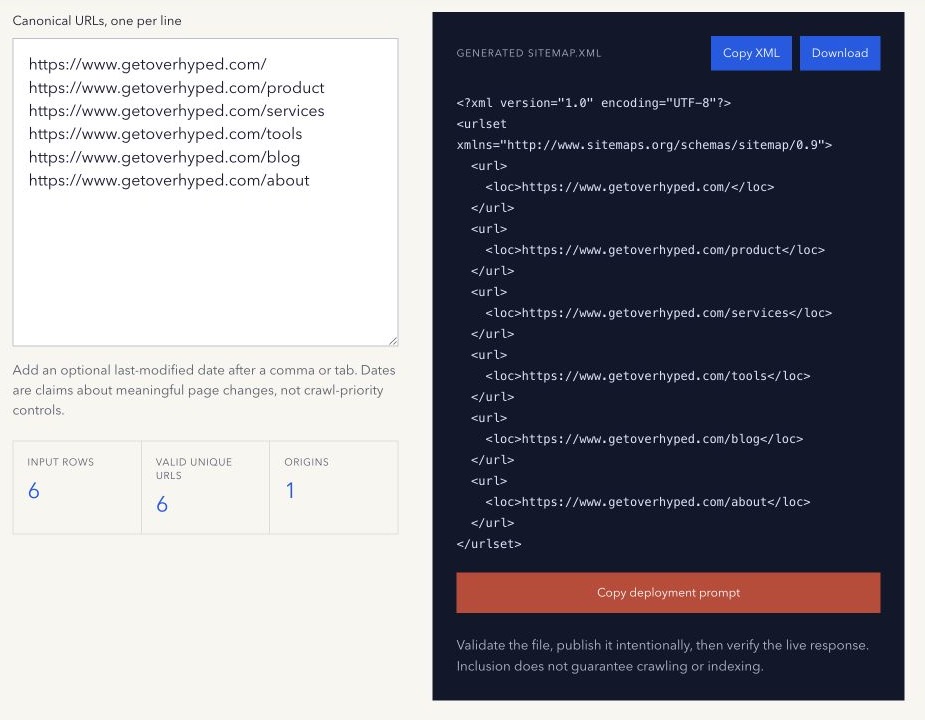
Generate sitemap XML from a reviewed canonical URL list with the free XML Sitemap Generator, then validate the deployed file separately.
If URL selection is part of a wider migration or recurring crawl and indexing problem, review how Overhyped scopes managed SEO and AEO work before onboarding. The exact implementation responsibilities are agreed in writing for each engagement.
Method note: generation happens in the browser from the URLs entered. The tool does not crawl the site or upload the result. The fictional examples above illustrate URL selection, not measured indexing results. Last reviewed 16 October 2026.