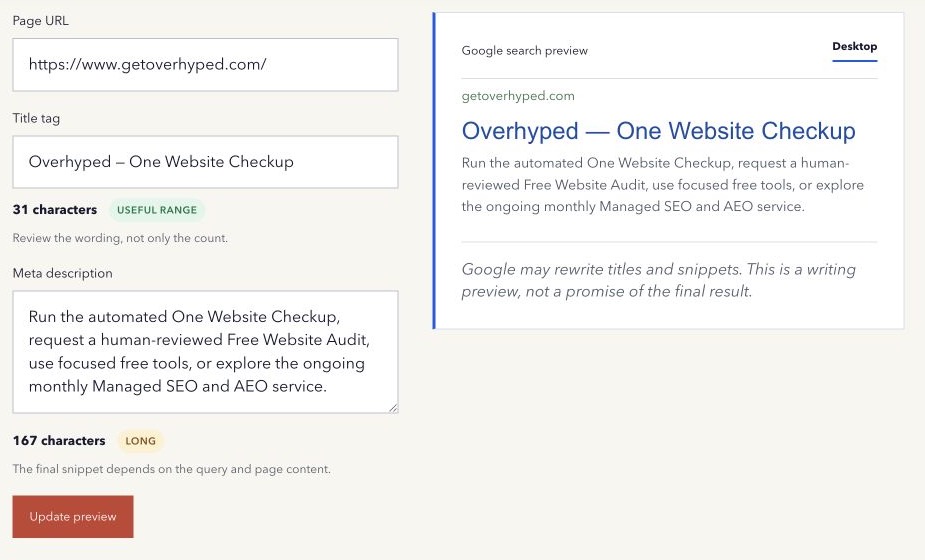
A search preview is a writing aid. It is not a screenshot of a future Google result.
That caveat matters because Google can build a title link and snippet from several parts of a page. The result may also change for different searches.
The title tag is an input, not a command
The HTML title is important because it gives search systems and browsers a concise name for the page. But Google can also consider the visible main title, headings, prominent text, anchor text from links, and other references to the page.
A rewrite may happen when the supplied title is vague, repetitive, outdated, stuffed with keywords, inconsistent with the page, or identical across many URLs. It can also happen when Google believes another label better represents the result for the query.
Google explains these sources in its title links documentation.
The meta description is also a suggestion
Google often creates snippets from page content because a visible passage can match the search more closely than one general description. It may use the meta description when that text provides a better summary.
This means a different snippet is not automatically a technical failure. Compare it with the query and the passage Google selected. The rewrite may reveal that the page answers several different questions.
Google’s snippet guidance describes how page content and meta descriptions can be used.
What a SERP preview can help you do
A preview lets you read the title, URL, and description as one unit. It can reveal repeated words, a buried topic, a vague promise, an unreadable path, or a description that does not match the title.
It cannot reproduce every font, device width, rich result, date, site name, or query-specific rewrite. It also cannot predict position or traffic.
Review the page before editing the tag
If a title is repeatedly rewritten, compare these elements:
- the HTML title;
- the visible H1;
- the main page topic and current content;
- internal links pointing to the page;
- repeated site-name or boilerplate text;
- the queries where the rewrite appears.
Make the page internally consistent. Avoid forcing exact wording when the visible content tells a different story.
For descriptions, improve useful visible sentences as well as the meta tag. A strong page gives the search engine better passages to choose from.
A safer publishing check
Write an accurate title, a useful description, and a readable URL. Preview them together. Publish the page. Inspect the live HTML. Then use Search Console and real searches to observe what happens over time.
Open the free Google SERP Preview to review your wording with the rewrite limitation kept visible.
Method note: the preview is illustrative and does not call Google or reproduce a live result. Last reviewed 16 August 2026.