
A canonical declaration helps search engines understand which URL you prefer when the same or very similar content can be reached through several addresses. The difficult part is not finding the tag. It is deciding whether the value matches the website’s real URL strategy.
That decision needs evidence from the final live page, not only a line copied from a template.
A canonical tag example with two URLs
Suppose a campaign URL, https://example.com/guide?campaign=email, displays the same guide as https://example.com/guide. If the clean URL is the intended representative, both pages can declare:
<link rel="canonical" href="https://example.com/guide" />The campaign page remains accessible. The tag communicates a preference; it does not redirect visitors or guarantee Google’s choice. Verify equivalent content and an accessible destination before copying this hypothetical example. A genuinely distinct page needs its own URL decision.
Alternate page with proper canonical tag: what to check
This Search Console status can describe a duplicate whose canonical points to the intended representative. It does not automatically need a fix. Inspect the alternate URL and preferred URL, compare the declared and Google-selected canonical, and confirm that the preferred page is the one you want in Search. Google documents the status in its Page indexing report help.
If that matches your plan, preserve it. If the destination is wrong, identify the responsible template or CMS setting, align conflicting signals, deploy, and recheck. Avoid changing every alternate to a self-canonical simply to reduce an exclusion count. See the indexing guide for the difference between eligibility and inclusion.
What a canonical declaration communicates
An HTML canonical is a link element in the page head:
<link rel="canonical" href="https://example.com/preferred-page" />Google describes rel="canonical" as a strong canonicalization signal, alongside redirects, while sitemap inclusion is weaker. These signals can reinforce one another, but Google can still select a different representative URL when the wider evidence conflicts. See Google’s canonical URL documentation.
A missing canonical is therefore not automatically a broken page. It matters most when duplicate or near-duplicate URL versions can exist.
A self-referencing canonical is a useful default for many indexable templates because it states the preferred URL explicitly. Use one absolute public URL so the host and path are unambiguous, but do not add a self-canonical mechanically when a page is intentionally consolidated elsewhere.
Start with the final URL
The address entered into a checker may redirect before returning HTML. Compare the canonical with the final response URL, not only the starting address.
For example, an HTTP URL may redirect to HTTPS, a non-www host may redirect to www, or an old path may redirect to a new one. A canonical on the destination should normally reflect the intentional preferred URL after those redirects.
Record the complete chain when a migration or hostname change is involved. A self-canonical on the final page is clearer than a canonical that points back into an old redirect.
Check how many canonicals exist
One deliberate declaration is easier to interpret than several competing values. Duplicate canonicals can appear when a CMS, SEO plugin, theme, and client-side script each add their own tag.
Inspect the original response HTML as well as the rendered DOM when JavaScript may alter the page head. If several values are present, identify which system owns each one before removing anything.
Review differences instead of scoring them
A canonical that differs from the final URL may be intentional. Common examples include syndicated content, filtered product collections, tracking parameters, print views, or duplicate campaign pages.
It may also be stale or incorrect. Review these questions:
- Does the canonical destination return a successful public response?
- Is its content equivalent to the checked page?
- Do internal links and the sitemap support the same preferred URL?
- Does a redirect point somewhere different?
- Is a cross-domain canonical part of an approved publishing arrangement?
Do not automatically replace every different canonical with a self-reference. That could undo a deliberate consolidation decision.
Canonical and redirect signals are related but do different jobs. A redirect moves the visitor to another URL. A canonical allows the current page to remain accessible while suggesting a preferred representative. Cross-domain canonicals can be appropriate for approved syndication, but the destination and publishing agreement need to be verified.
What a public checker cannot prove
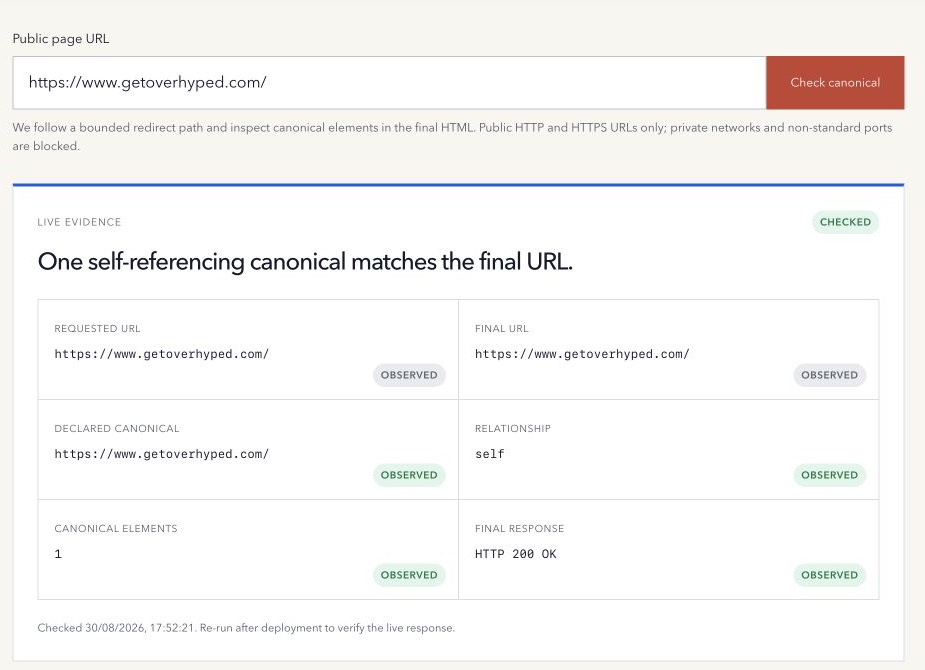
A live checker can observe redirects, the final response, canonical elements, and the relationship between the declared and final URLs. It cannot show Google’s selected canonical or confirm whether Google has processed a recent change.
For a property you control, use Search Console URL Inspection to compare the user-declared and Google-selected canonical. Remember that indexed evidence can lag behind the current live page.
A safer canonical QA workflow
- Check the exact public URL people and crawlers can request.
- Record every redirect and the final response URL.
- Inspect every canonical declaration in the final HTML.
- Confirm the intended preferred URL with the site owner or migration plan.
- Align internal links, sitemap entries, redirects, and canonical markup where appropriate.
- Deploy the change and check the live URL again.
- Use Search Console for Google-specific canonical evidence.
Use the free Canonical Tag Checker to compare one live page’s declared canonical with its final URL.
Method note: the checker performs a guarded public fetch, follows a bounded redirect path, and reports canonical evidence from the final HTML. It cannot access private Search Console data. Last reviewed 17 October 2026.